E-invoicing connector help
Recommendations and best practices
How to run the connector well — what to schedule, what to log, what to check after a database refresh, and who to give access to.
Written for: Administrators and operations leads
This is opinionated guidance, not reference material. The other guides describe what the connector can do; this one recommends how to run it well. The numbers here — intervals, thresholds, retention — are sensible starting defaults to tune against real volume once you are live.
Recommended job schedules
The batch jobs that drive the connector live under Dr Dynamics e-invoicing → Periodic tasks. The table below is a recommended baseline for the core jobs; adjust intervals to your volume and your delivery SLAs.
| Job | Recommended cadence | Why this cadence |
|---|---|---|
| Send pending outbound e-invoices | Every 10 minutes, business hours | Keeps outbound latency low without hammering the provider. |
| Get inbound e-invoices | Every 10 minutes | New vendor invoices appear promptly. |
| Process inbound e-invoices | Every 10 minutes, offset a few minutes after Get messages | Processes the headers the fetch just brought in. |
| Poll invoice status (batch) | Hourly | Delivery tracking rarely needs finer granularity. |
| Process rejected e-invoices | Hourly | Refusals are infrequent; hourly is responsive enough. |
The settlement jobs — Detect settled inbound e-invoices and Process paid e-invoices — are daily, and run in that order. The full catalogue is in the administration guide.
Ordering and dependencies
One pair must run in order — schedule the dependent job to start a few minutes after its feeder, or chain them in the same batch:
- Get messages → Process inbound. Processing can only work on headers that have been fetched.
The outbound pair, Send then Poll status, has no hard ordering: a row must be Sent before it can be polled, but the hourly poll naturally lags the 10-minute send.
Practical scheduling tips
- Use a dedicated batch group for all the e-invoice jobs. It lets you pause and resume the connector as a unit — useful during provider maintenance, and a clean group to resume after a refresh — and keeps its load off other batch groups.
- Set the Send job’s “Send to provider” toggle to Yes for the unattended schedule. Otherwise it would generate-and-hold every row and nothing would transmit.
- Decide on auto-reprocess once. If you want the Send and Process jobs to self-heal stuck rows, turn on Auto-reprocess stuck rows in parameters; otherwise stuck rows wait for a manual reset. For a high-deploy environment, on is the lower-toil choice.
- Watch the job log, not your inbox. The E-invoice job log records every run with per-run tallies. A daily glance at the Failed column there is the cheapest health check you have.
Recommended database logging
There are two distinct kinds of logging to think about: the change-audit of configuration (who changed a setting), and the operational logs the connector writes itself (and how long to keep them).
Audit configuration changes
The connector’s settings decide where invoices go and which credentials are used, so changes to them should be auditable. Turn on the standard Finance Database log (System administration → Setup → Database log) for the configuration tables, capturing Insert, Update, and Delete:
| Table / screen | Why audit it | Priority |
|---|---|---|
| E-invoicing parameters | Provider selection, secret-name references, ER mappings, the auto-queue and auto-reprocess toggles, the stuck and cooldown timers. Any change here changes system behaviour. | High |
| Company identifiers | The receiver-UUID to legal-entity routing. A wrong edit silently misroutes inbound invoices. | High |
Audit the secret names, not the secrets. The parameters hold the names of Key Vault entries, never the values — so database-logging them is safe and meaningful. You capture “the API-key reference was repointed” without ever recording a credential. The values live in Azure Key Vault and have their own access log there.
Keep database logging narrow. Database log is write-amplifying. Do not point it at the high-volume queue tables: they would generate enormous log volume, and the connector already keeps its own per-row audit trail. Limit it to the two low-volume setup tables above.
Retain, and prune, the connector’s own logs
The connector writes three operational logs (see the security and operations reference for the model). Two of them grow with volume and need a retention plan:
| Log | Growth | Recommendation |
|---|---|---|
| Queue logs (per step) | Moderate — a handful of rows per invoice | Keep for the audit window you need, for example 12 to 24 months, then purge older rows on a schedule. |
| Job log (per run) | Low | Keep long-term; it is small and useful for trend and SLA review. |
| HTTP log (per call, full request and response bodies) | High — full payloads | Keep a short, deliberate window, for example 30 to 90 days. It is your rejection-decoding tool, not a permanent archive. Schedule a recurring cleanup of older entries. |
The HTTP log is the one to watch. Because it stores the full request and response bodies of every provider call, it is the fastest-growing table in the module. Decide a retention window up front and prune to it — long enough to investigate a rejection, short enough to stay small.
Recommended post-refresh activities
When production data is copied into a sandbox, or any database is restored, the e-invoicing configuration comes with it — including live provider credentials’ secret names and any batch jobs. Without care, a test environment can fetch real inbound invoices and, worse, transmit test invoices to real customers through the live provider. Treat the refresh as a hazard and run this drill before anyone uses the environment.
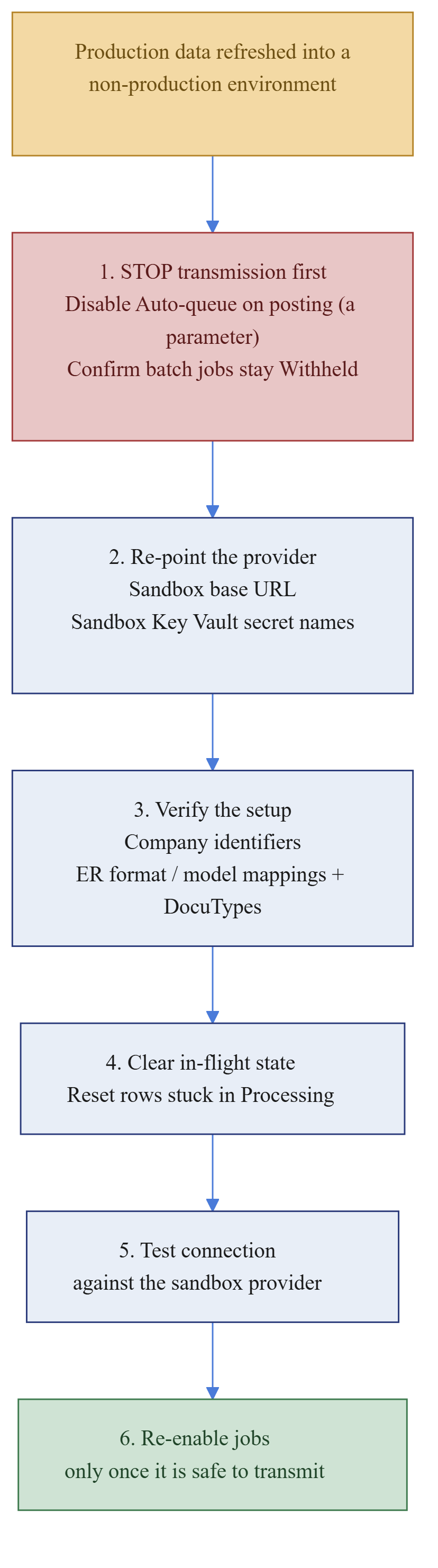
- Stop transmission first — before anything else.
- Turn Auto-queue e-invoices on posting off in parameters. This is a parameter, not a batch job — the platform does not pause it for you, so it is the one thing you must disable by hand.
- Confirm every e-invoice batch job is withheld. A database refresh automatically sets all batch jobs to Withhold, so the connector’s jobs are already paused. The risk here is resuming them before the environment is safe, not pausing them. Leave them withheld until step 6.
- Re-point the provider to non-production.
- Set the provider base URL to the sandbox or test endpoint.
- Point the three secret-name fields at sandbox Key Vault entries, a test provider account, so no call can authenticate as production. If in doubt, leave them unresolved so calls fail safe rather than succeed against production.
- Verify the setup carried over correctly.
- Company identifiers — the receiver UUIDs should match the test tenant, not production.
- ER format and model mappings, and DocuTypes — confirm they resolve in this environment.
- Clear in-flight state. Reset any rows left in Processing by the refresh so they are not mistaken for live work.
- Test the connection against the sandbox provider before re-enabling anything.
- Re-enable jobs only once it is provably safe to transmit — and only the jobs you actually want running in that environment.
The cardinal rule of non-production. A sandbox must never send a real invoice to a real customer or notify the real provider. Steps 1 and 2 exist solely to guarantee that. Make them the first thing that happens after every refresh, ideally as a documented runbook the refresh owner signs off.
Production after a restore. The same drill applies in reverse to a production restore: confirm the provider URL and secret names point at production, that no test data is queued to send, and reset any rows the restore froze in Processing before re-enabling the jobs.
Recommended security assignment
The full catalogue is in the security and operations reference; this is the assignment guidance.
| Person | Standard Finance role | Add e-invoicing role |
|---|---|---|
| AR clerk / supervisor | Accounts receivable | e-Invoicing AR user |
| AP clerk / supervisor | Accounts payable | e-Invoicing AP user |
| Support / operations | (as appropriate) | e-Invoicing troubleshooter |
| Named system administrator | System administrator | e-Invoicing administrator |
| Auditor / read-only stakeholder | (read-only) | e-Invoicing inquiry |
Principles:
- Additive, one role each. Add the e-invoicing role on top of the standard Finance role; do not stack two e-invoicing roles. Someone who needs both queues is a troubleshooter.
- Keep administrator small and named. Only the administrator role can change the provider and the secret references. Hand it to a small, audited group, not to everyday support. Recovery — reset, relink, technical reject — is the troubleshooter’s job and needs none of those rights.
- Segregate setup from operation. This separation is the system’s main internal control: the people who run invoices cannot silently repoint where they go.
- Review on a cadence. Re-check role membership at the same cadence as your other privileged-access reviews, especially the administrator role.
Practices that are easy to miss
A checklist of operational concerns the topics above do not cover.
- Monitoring and alerting. Beyond the daily job-log glance, set a lightweight alert on a rising Failed count in the job log, and on rows sitting in Processing past the stuck threshold. These are your two earliest “something is wrong” signals.
- Credential rotation cadence. Agree a rotation schedule for the provider credentials with whoever owns Key Vault. Rotation is a Key Vault value change — nothing changes in Finance — but run Test connection straight after to confirm.
- Connection health check. Run Test connection as a routine smoke test after any deployment, refresh, or credential change, and as the first diagnostic when sends start failing in bulk.
- Attachment storage. Every generated and sent file, and every inbound body, is stored as a document attachment. Over time this is real storage — fold it into your normal document-management retention rather than letting it grow unmanaged.
- ER mapping is the durable fix. Recurring generation or rejection problems — the line-rounding case in the administration guide is the classic — are usually fixed properly in the ER format or model mapping, not by hand-editing files. Treat repeated hand-edits as a signal to change the mapping, and put ER-mapping changes through your normal change control.
- Document your receiver UUIDs. Keep an external note of which receiver UUID maps to which legal entity and why. The mapping is small but business-critical, and the on-screen record does not explain the why.
- Volume tuning. If inbound volume is high, raise the Inbound fetch page size so each fetch brings more messages. If the provider rate-limits, lengthen the Send and Get cadence. Tune against observed behaviour, not guesses.
- Own the runbook. Name who holds the troubleshooter role and is on the hook when a row needs recovering. The tools are only as good as the person who knows to use them.
Go-live and operations checklist
Before go-live
- Provider connection configured (base URL and three secret names) and Test connection green.
- Outbound ER configuration complete for every document type in use — format mapping and DocuType.
- Inbound ER configuration complete: DocuType, model mapping, fetch page size.
- Company identifiers mapped for every legal entity that receives inbound invoices.
- Auto-queue on posting and Auto-reprocess stuck set to your intended values.
- Stuck threshold and Reset cooldown reviewed; defaults are 30 and 60 minutes.
- All batch jobs scheduled in a dedicated batch group, with the dependent pair (Get messages → Process inbound) ordered.
- Database log enabled on E-invoicing parameters and Company identifiers.
- HTTP log retention job scheduled.
- Security roles assigned — additive, one each — with the administrator role limited to a named group.
- An end-to-end test completed in a test environment: queue → send → poll, and fetch → process → import.
Steady state
- Daily: glance at the job log Failed column; investigate any non-zero.
- Daily: scan for rows stuck in Processing past the threshold; reset or rely on auto-reprocess.
- Weekly: review outbound rows with External status of Rejected, Refused or Failed, and follow up.
- Per refresh: run the post-refresh safety drill before anyone uses the environment.
- Per credential rotation: update Key Vault, then Test connection.
- Periodically: confirm HTTP log pruning is running and the table is not growing unbounded.