E-invoicing connector help
Security and operations reference
The authoritative catalogue of the connector's security objects and operational surface — every role, duty and privilege, the navigation map, the audit-log model, and every status value in one place.
Written for: Administrators, security officers, and auditors
Where the AR, AP and administration guides tell people how to do their job, this document answers what exists and what each thing is for.
Use it to:
- assign the right access to the right people (the security catalogue below);
- answer an auditor’s “who can do what, and how is it enforced?” question;
- find any screen or job in the module (the navigation map);
- decode any status value in one place (the status reference).
How access is enforced — three gates. Every button is gated in the UI by a single predicate, and the same rule is re-checked on the server by the state machine before any status changes. Security privileges sit on top of that: they decide whether the button is even visible to you. So “can this user do X?” has three independent gates — the privilege grants the menu item, the rule enables the button for the row’s state, and the state machine enforces it again on commit.
Security model
The security model is greenfield and custom — purpose-built for this connector rather than extending Microsoft’s standard roles. Three design choices shape it:
- Fine-grained — roughly one privilege per button. Each action (send, poll, reset, relink, and so on) is its own privilege. Access is tuned by adding or removing a single privilege, and a button disappears for a user the moment its privilege is removed. No role rewrite needed.
- Additive roles. The e-invoicing roles are assigned in addition to a user’s standard Finance roles (Accounts receivable, Accounts payable), never instead of them. An AR clerk keeps their AR role and gains the e-Invoicing AR user role on top.
- Segregation of setup from operation. The ability to operate and recover rows is separated from the ability to change how the system is wired — provider selection and secret references. Only the administrator role holds the latter.
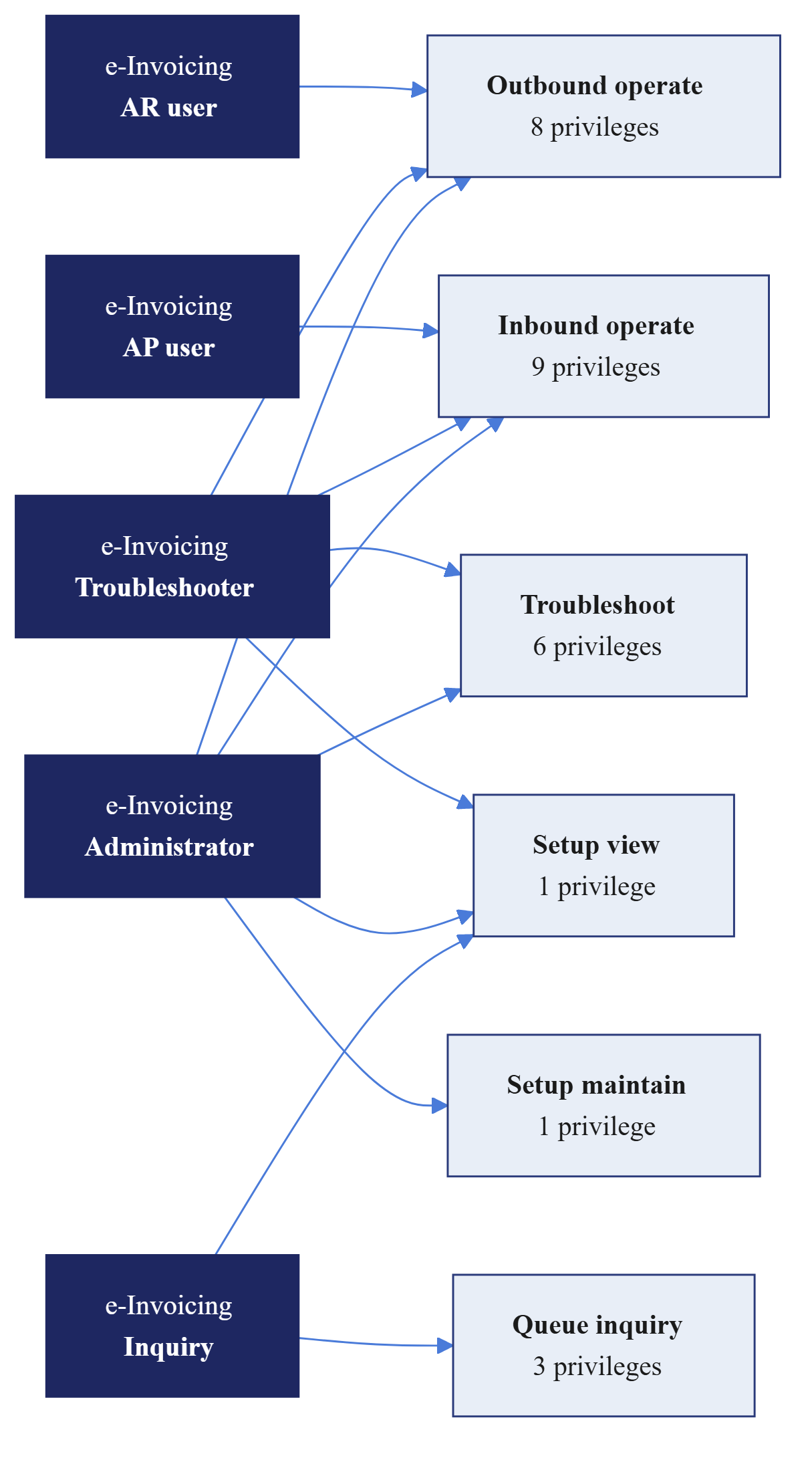
The model has 5 roles, 6 duties, and 23 privileges. Roles are composed from duties; duties are composed from privileges.
Roles
Five roles, each a named job profile. Assign exactly one e-invoicing role per user, on top of their standard Finance access.
| Role | What it is for | Composed of (duties) |
|---|---|---|
| e-Invoicing AR user | Operate the outbound (customer and project) queue: queue, send, poll, archive, open source and queue rows, read outbound rows and logs. | Outbound operate |
| e-Invoicing AP user | Operate the inbound (vendor) queue: fetch, process, reject, process rejected, archive, open target and queue rows, read inbound rows and logs. | Inbound operate |
| e-Invoicing troubleshooter | Recover stuck rows across both queues (reset, relink, technical reject), run batch jobs, read the HTTP log. Includes AR and AP operational access and read-only setup. | Outbound operate · Inbound operate · Troubleshoot · Setup view |
| e-Invoicing administrator | Everything the troubleshooter has plus maintaining parameters, provider selection, and secret references. A named, segregated administrator account. | Outbound operate · Inbound operate · Troubleshoot · Setup view · Setup maintain |
| e-Invoicing inquiry | Read-only access to both queues, the queue and job logs, and the parameters. No operate, batch, or HTTP-log access. | Queue inquiry · Setup view |
Role to duty matrix
| Duty | AR user | AP user | Troubleshooter | Administrator | Inquiry |
|---|---|---|---|---|---|
| Outbound operate | ● | ● | ● | ||
| Inbound operate | ● | ● | ● | ||
| Troubleshoot | ● | ● | |||
| Queue inquiry | ● | ||||
| Setup view | ● | ● | ● | ||
| Setup maintain | ● |
Note the gaps. AR and AP users do not get Setup view — operators cannot see the parameters screen. The troubleshooter gets read-only setup, to diagnose, but not Setup maintain. Only the administrator can change parameters. The inquiry role is the only one built on Queue inquiry, the read-only views, rather than the operate duties.
Duties
Six duties, each a coherent bundle of privileges. Duties are the reusable building block — a new role is assembled from duties, not from raw privileges.
| Duty | Purpose | Privileges |
|---|---|---|
| Operate outbound e-invoice queue | Everything an AR operator does on the outbound queue. | 8 |
| Operate inbound e-invoice queue | Everything an AP operator does on the inbound queue. | 9 |
| Recover stuck e-invoices (Troubleshoot) | Cross-queue recovery, batch jobs and the HTTP log. | 6 |
| Inquire into e-invoice queues | Read-only access to both queues and the queue and job logs. | 3 |
| View e-invoice setup | Read-only access to parameters and company identifiers. | 1 |
| Maintain e-invoice setup | Create and update parameters, provider selection, secret references. | 1 |
Why the counts do not sum to 23. Several privileges belong to more than one duty — Archive e-invoice queue row and View e-invoice queue and job logs are each held by both operate duties, and the inquiry duty reuses the read privileges. The 23 is the count of distinct privileges; the column above counts assignments.
Privileges — the full catalogue
The privileges, grouped by the duty that owns them. Each privilege gates one capability; the Unlocks column names the button or screen it controls.
Outbound operate
| Privilege | Unlocks |
|---|---|
| Queue outbound e-invoice | Send e-invoice on the invoice journals, and manual Create e-invoice — adds an Awaiting-transfer row. |
| Send outbound e-invoice | Process — runs Generate → Send, including generate-and-hold. |
| Poll outbound e-invoice status | Update status — refreshes External status. |
| Archive e-invoice queue row | Archive. Shared with inbound. |
| Open outbound source invoice | Open source record, and View e-invoice from the customer or project journal. |
| Open outbound e-invoice queue row | Jump to the queue row from a log entry. |
| View outbound e-invoice queue | Read the Outbound e-invoices list. |
| View e-invoice queue and job logs | View history / View log, and the job log. Shared with inbound. |
Inbound operate
| Privilege | Unlocks |
|---|---|
| Fetch inbound e-invoice messages | Get inbound e-invoices — fetches new headers. |
| Process inbound e-invoice | Process — runs Fetch → Import → Link → Ack. |
| Reject inbound e-invoice | Reject — business refusal request. |
| Process rejected inbound e-invoice | Process rejected — carries out refusal consequences. |
| Archive e-invoice queue row | Archive. Shared with outbound. |
| Open inbound target invoice | Open target record, and View e-invoice from the vendor invoice. |
| Open inbound e-invoice queue row | Jump to the queue row from a log entry. |
| View inbound e-invoice queue | Read the Inbound e-invoices list. |
| View e-invoice queue and job logs | View history / View log, and the job log. Shared with outbound. |
Troubleshoot and recovery
| Privilege | Unlocks |
|---|---|
| Reset outbound e-invoice | Reset a stuck outbound row (Processing → Awaiting transfer). |
| Reset inbound e-invoice | Reset a stuck inbound row, back to Received. |
| Relink inbound e-invoice | Relink an Imported row with Validation failed set, to the right pending vendor invoice. |
| Technically reject inbound e-invoice | Technical reject — negative callback for a failed, never-acknowledged message. |
| View e-invoice HTTP log | View HTTP log and the E-invoice HTTP log inquiry. |
| Run e-invoice batch jobs | The Periodic tasks batch menu items. |
Setup
| Privilege | Unlocks |
|---|---|
| View e-invoice parameters | Read E-invoicing parameters and Company identifiers. |
| Maintain e-invoice parameters | Create and update E-invoicing parameters, provider selection, secret references, and company identifiers. |
Two privileges are shared across both operate duties — Archive e-invoice queue row and View e-invoice queue and job logs. That is deliberate: archiving and log-reading mean the same thing on both queues, so the same privilege backs both, and “can read the logs” is one decision, not two.
Assigning the roles
Assign through System administration → Security → Assign users to roles, or from the user record. Two rules:
- Always additive. Keep the user’s standard Finance role (Accounts receivable or Accounts payable) and add the e-invoicing role on top. The e-invoicing role does not grant any standard AR or AP capability.
- One e-invoicing role per user. The roles are designed to be mutually exclusive job profiles. A user who genuinely needs both AR and AP operation is a troubleshooter, which includes both, not two roles stacked.
| Person | Standard role | Add e-invoicing role |
|---|---|---|
| AR clerk / supervisor | Accounts receivable | e-Invoicing AR user |
| AP clerk / supervisor | Accounts payable | e-Invoicing AP user |
| Support / operations | (as appropriate) | e-Invoicing troubleshooter |
| System administrator (named) | System administrator | e-Invoicing administrator |
| Auditor / read-only stakeholder | (read-only) | e-Invoicing inquiry |
Keep the administrator account small and named. Because Setup maintain is the only path to the provider selection and the Key Vault secret references, the administrator role should sit with a small, named, audited group — not handed out broadly. Day-to-day unsticking is the troubleshooter’s job and needs none of those rights.
Navigation map
Everything lives under the Dr Dynamics e-invoicing module menu.
| Group | Item | What it opens | Gated by |
|---|---|---|---|
| E-invoices | Outbound e-invoices | The AR outbound queue list. | View outbound queue |
| Inbound e-invoices | The AP inbound queue list. | View inbound queue | |
| Inquiries | Inbound e-invoice logs | Inbound queue audit log. | View logs |
| Outbound e-invoice logs | Outbound queue audit log. | View logs | |
| E-invoice HTTP log | Raw provider call log. | View HTTP log | |
| E-invoice job log | One row per batch or manual run. | View logs | |
| Periodic tasks | Send pending outbound e-invoices | Outbound Send batch. | Run batch jobs |
| Poll invoice status (batch) | Outbound status-poll batch. | Run batch jobs | |
| Get inbound e-invoices | Inbound header fetch. | Run batch jobs | |
| Process inbound e-invoices | Inbound pipeline batch. | Run batch jobs | |
| Process rejected e-invoices | Refusal-consequences batch. | Run batch jobs | |
| Setup | E-invoicing parameters | The full parameter set. | View / Maintain setup |
| Company identifiers | Receiver-UUID to legal-entity map. | View / Maintain setup |
The per-row buttons — Process, Update status, Reset, Archive, Relink, Technical reject, View history, View log, View HTTP log, Open source and Open target — live on the two queue list pages and are gated by the matching privilege above plus the row’s state.
The audit-log model
Every status change and every provider call is recorded. There are three log surfaces; knowing which one answers which question saves time.
| Log | One row per… | Answers | Where |
|---|---|---|---|
| Outbound / Inbound queue log | pipeline step on a row (Claim, Generate or Fetch, Send or Import, and so on) | “What happened to this row, step by step, and why did it fail?” | View history / View log on the row; Inquiries → queue logs |
| E-invoice job log | batch or manual run | “Did the 09:00 job run, and what did it process, fail, skip or hold?” | Inquiries → E-invoice job log |
| E-invoice HTTP log | provider call | “What exactly did we send and what did the provider return?” | View HTTP log; Inquiries → HTTP log |
Logging never blocks the business flow. Audit-log writes run in their own short transactions and swallow any error — a failed log write cannot stop a send or an import. The authoritative record of a row’s state is the row itself, written only by the state machine; the logs are the explanation around it. If the two ever seem to disagree, trust the row’s status and reconstruct the rest from the HTTP log.
Status reference
All status enumerations in one place. The user guides explain these in context; this is the quick lookup.
Outbound — Transfer status
| Status | Meaning |
|---|---|
| Awaiting transfer | Queued, not yet sent; no file produced. |
| Processing | Claimed by a worker; generating or sending now. |
| Generated | File produced and attached but held, awaiting a manual send (generate-and-hold). |
| Sent | Transmitted to the customer through the network. |
| Failed | A step could not complete; resettable and retryable. |
Outbound — External status (delivery tracking, read-only)
| Status | Meaning | Terminal? |
|---|---|---|
| None | No provider report yet. | |
| Sent | Submitted to the provider. | |
| Delivered | Reached the recipient’s access point. | |
| Fetched | Recipient retrieved it. | |
| Deposited | Lodged with the recipient or tax platform. | |
| Approved | Accepted by the recipient. | |
| Processed | Fully processed by the recipient. | ● |
| Paid | Marked paid by the recipient. | ● |
| Rejected | Rejected on structural or validation grounds. | ● |
| Refused | Refused on business grounds. | |
| Failed | Provider reported a delivery failure. | ● |
Terminal means polling stops and Update status greys out.
Inbound — Inbound status
| Status | Meaning |
|---|---|
| Received | Header fetched; body not yet processed. |
| Processing | Claimed; running Fetch, Import, Link and Ack. |
| Imported | Imported as a pending vendor invoice, awaiting AP review. Not yet posted. |
| Failed | A step failed; resettable and retryable. |
| Rejected | An operator refused it, on business or technical grounds; consequences run asynchronously. |
| Reject notified | Refusal consequences carried out and provider notified. Terminal. |
| Archived | Manually closed without payment or rejection. Terminal. |